


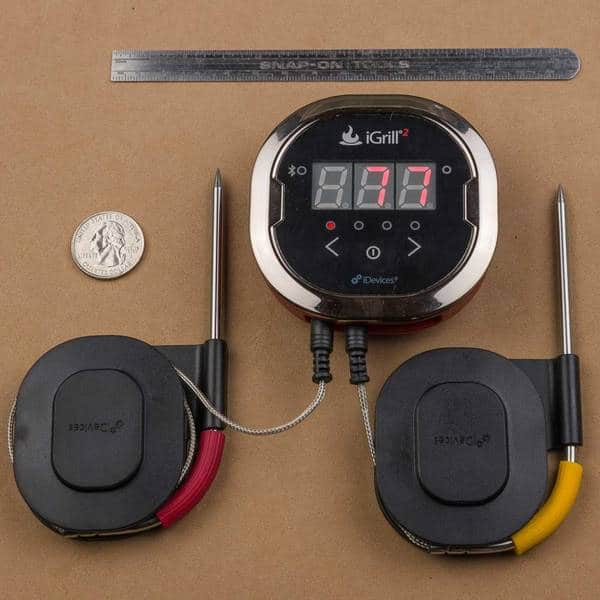
The iDevices iGrill2 is the successor to the iGrill. It is a Bluetooth-enabled remote thermometer that has two probes, each of which can monitor food or cooker temperature. Currently, there is only an Apple app but an Android app is scheduled for August of 2014. The device can be used without a smart device as a thermometer only. Apple devices must have iOS 7 or later installed.
Normally, thermometers of this type stay on indefinitely. This unit features an auto-off capability that varies with the circumstances. If a probe is inserted and the unit is connected to a smart device, such as an iPhone or iPad, it will not shut itself off. If there is a probe but no connection, it will auto-shutoff in 8 hours. If there is no probe connected and no connection to a smart device, it will shut off after 5 minutes. This will prevent accidental battery depletion.
Four probes can be inserted into the device, (two are supplied with the unit) and the single readout can display any of them by pressing the “<” button or the “>” button. Holding “<” or “>” will initiate cycling among probes. Pressing either of these buttons momentarily will end the cycling, and display only the selected probe.
Using the smart device app, you can select from a list of meat/doneness choices or choose your own setting for each probe independently. An alarm will sound when that setting has been reached. Alternatively, you can set a range of temperatures, and the alarm will sound if the probe senses a temperature above or below the set limits. These settings can be saved.
You can rename the probes if you want, either by their function or their identifying colored collars. You can also set multiple timers for each probe.
There is a Globe feature that let’s you share experiences and photos from other iGrill2 users. You can share yours via Facebook, if you want.
You can view a graph of temperature vs. time on your smart device, or export a CSV file for plotting in an application such as Microsoft Excel.
In order to reduce battery consumption, the unit will enter a sleep mode when the smart device is too far from the transmitter. Thresholds: sleep > 30′, wake <5′
The iGrill2 uses the same smart device app as the iGrillmini.
In early August of 2014, the manufacturer of this product issued a recall on the Pro Probes that come with the iGrill2. Apparently the probes did not withstand heat as well as they should. If you own this product, you might want to visit their website to determine what steps to take to get replacement probes.