


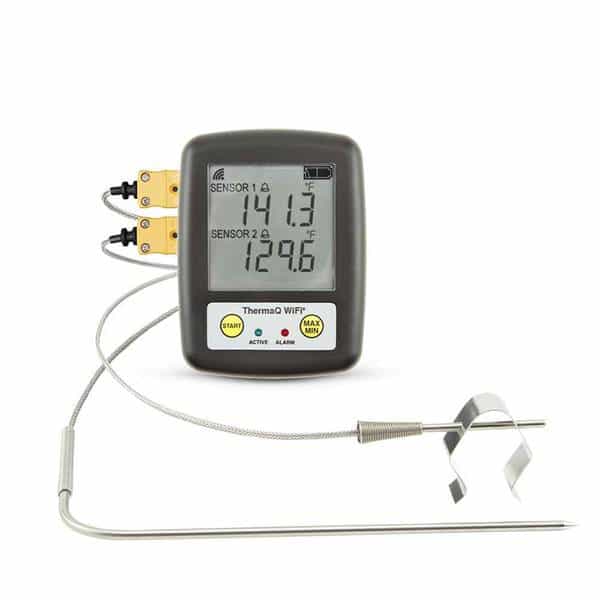
The ThermoWorks ThermaQ Wi-Fi is the latest addition to the ThermaQ family of thermometers. The Wi-Fi version is a two-channel device that connects to a local router, accesses a server in the cloud, and makes monitoring possible anywhere there is an internet connection. Any K-type thermocouple probe can be used, extending the range of applications considerably.
The first step – one that does not need to be repeated unless you wish to communicate with a different router – is setting up the connection to your home router. This gave me fits at first. Because we travel in an RV full-time, and we weren’t in our home park, our router was not connected to the internet, so it was useless. I tried to connect to an AT&T Wi-Fi modem, but I was unable to make that work. I went around and around with tech support, and wasn’t able to communicate until I got to home base and could connect our ActionTec router to the internet.
The downloaded app walks you through the connection process, although it can be a little tricky because certain steps have to be completed in a short period of time, or you have to try again. After a bit of a learning curve, I got it up and running and haven’t had any problems since. There have since been a few updates to the app, which may have smoothed the connection process. The same app is also used to communicate with the ThermaQ Blue – a Bluetooth device – and up to four devices can be monitored simultaneously.
The device itself displays the current temperature for each probe. A push-button can cycle through the current readings, the minimum temps, and the maximum temps for each channel. The app and the device don’t coordinate resetting the min and max temps, which is a bit confusing. To reset the device min and max, you have to depress and hold the MAX/MIN button for a few seconds. On the app, you reset the min and max in the settings window. The device has icons to indicate connectivity with the router and the cloud. The device also stores data for the session as indicated by a “LOGGING” indicator at the top, and battery condition is displayed in the upper right. Unfortunately, there is no back light for the display, so you’ll need a flashlight if it’s dark outside.
The device’s two channels are individually configurable. You can set and enable a low and a high limit for the temperature. When either threshold is crossed, the device displays a little bell icon and a red LED flashes. After the alarm condition has cleared, the bell icon disappears, but the LED continues to flash. There is no sound capability on the device itself. On the app, an alarm condition is indicated on the circle displaying the temperature: the circle turns blue if the temp is below the low threshold and red if the temp is above the upper threshold. The app also sounds a selectable alarm tone.
Each channel is capable of displaying a graph of temperature vs. time, either the time of day or the elapsed time. If alarm limits are enabled, they are also displayed on the graph in red and blue, much like the circles mentioned above. The graphs can be individually restarted at any time. The underlying data for the graph can also be saved for later retrieval if desired on a channel by channel basis.
There is no up or down timer function in the app, something to keep in mind if you rely on a timer for cooking steps.
Like all ThermoWorks products, the ThermaQ Wi-Fi is built to industrial standards. The housing is rugged and well-sealed. The temperature probes that come with the kit employ heavier stainless-steel braided cable than competing offerings. There are strain reliefs at the connectors and at the probes themselves, assuring long life. The two AA batteries are claimed to last 4000 hours, so you may never need to change them.
At $279 for the kit, which includes the device, a clip to attach to a tripod, two temperature probes and a grill clip, it’s not exactly cheap. The app provides basic functionality, but could be improved, both in terms of features and ease of navigation. I expect that app updates will happen periodically.
We give the ThermaQ Wi-Fi a Gold Medal for its build quality, performance, and configurability. A timer would be a nice addition, and the app needs some fine-tuning, but if you’re looking for a top-quality Wi-Fi thermometer, this one makes a good addition to your cooking arsenal.