


This unit is no longer available.
The Thermoworks BlueTherm Duo is a two-channel, Bluetooth-enabled display that works with external probes and can communicate with desktop or mobile devices to display and log temperatures. The display unit cannot be left inside an oven/grill, but its probes can.
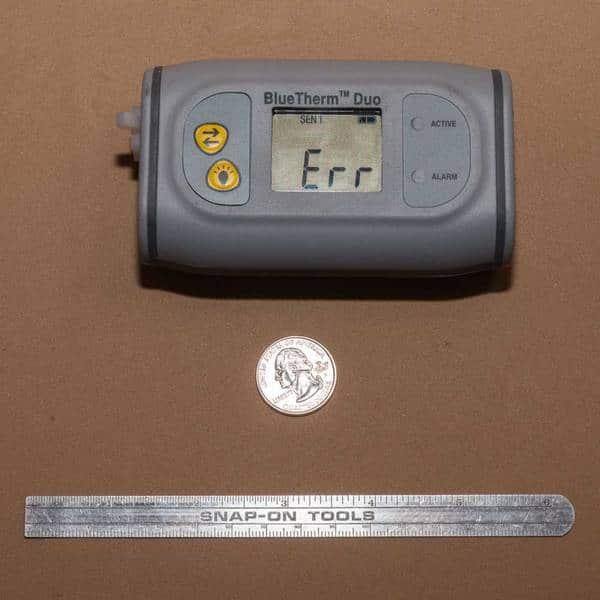
The unit displays the temperature of two probes and alarm status on its internal display. It communicates more information via a Bluetooth interface to desktop/laptop computers that have Bluetooth capability, or with smart devices like Android or Apple phones or tablets. (Note that in the product photo, the “Err” is displayed because there are no probes attached. Normally, the temperature would be displayed.) The software for these platforms is free and downloadable from Thermoworks or your device’s app store. The beauty of these features is that you can be taking it easy with a beer in hand while you monitor the temperatures of your food and smoker remotely. (Ah, life is grand!)
Using the free software, you can set upper and lower limits for the alarm temperatures for each probe. On the Android app, you can create custom named profiles with individual alarm settings for different kinds of food. The alarms are displayed on the device itself, but there is no audible alarm. You can perform a number of functions, including logging and graphing temperatures over time. The device itself displays temperatures in ºF, but the software can work in either F or C.

The display has a rechargeable battery that is refreshed via the USB port on the device. A full charge should give about 36 hours of continuous usage. There is a backlight that can be activated via a pushbutton on the face. A blue light will flash on the unit when connected via Bluetooth, and a red light will flash under alarm conditions.
The display carries a one-year warranty. The instruction sheet has a calibration certificate on the back. The manufacturer’s contact information, including address, telephone number and website, is printed in the instructions.
The unit is very solidly built and worked without problems, although range is limited – 70 feet according to the manufacturer. We give it a Bronze medal rating for its ease of use, accuracy and speed. We liked the ability to monitor temperatures from afar, but better range would be a plus. It’s an expensive unit, but industrial-strength, and its features probably appeal to someone whose need to log data is greater than a cook would require.
We used a 113-151 Fast Response Meat Probe to check the accuracy and response times of this unit. Different probes will produce different response-time results and cover different temperature ranges.
Meathead’s Notes from the Field:
“Introduced in June 2013, on paper this is the top of the line of remote reading thermometers. It is, in fact a great thermometer. Alas, the remote part leaves a lot to be desired. I no longer consider it a remote thermometer and I have lowered my rating of it.
The BlueTherm Duo uses thermocouple sensors that are more sensitive, more rugged, more precise, and with a wider range than the thermistors used on the Maverick and iGrill. This is a major advantage since the probes on the others are fragile and require careful handling. You can even use an instant read probe with it. This makes it by far the most versatile of the breed.
There are two free apps for iOS, BlueTherm Pro and BlueTherm Lite. The Pro version is the one you want for a portable device. ThermaData Studio, enables your Bluetooth enabled Windows PC (running XP and above) to receive signals from your BlueTherm Duo and record data.
The Pro app displays the temp for both probes in either Centigrade or Fahrenheit and you can easily switch with the app. Also in settings you can set the rate at which the sender updates the app from 1 to 30 seconds, and check the battery charge.
The app allows you to name your probes whatever you want (“meat” and “cooker”, for example). It lets you determine how often to record the data, from 10 seconds to 60 minutes, shows the minimum and maximum each has reached, can be set to play an alarm if a high or low is hit for either the meat or the oven, and lets you email the data to another computer or even a spreadsheet on you mobile device. You can create “profiles” with alarms, one for pork butt, another for brisket, for example, or one for Weber Smokey Mountain and another for MAK, for example.
The app’s interface is not very intuitive. In order to see a graph you have to hit the start button on the main screen, which does not tell you what it is starting. Then you need to rotate the iOS device on its side to see the graph. Nowhere does it tell you this.
As with many Bluetooth devices, pairing can sometimes be a real pain. It will only pair with one device at a time, so you cannot have it talk to the iPad in the kitchen and the iPhone in your pocket. In order to get everything in order, sometimes you have to reboot the BlueTherm Duo, sometimes you have to reboot your mobile device, sometimes both. There are two ways to reboot the Duo, and the best method, I have learned, is to hold the backlight button down until you get the reset message on the Duo. This apparently is better that just hitting the on/off button.
Do not download both apps. I had problems on my iPad loaded with both when I moved from one to the other. Just load the Pro.
The iGrill, which also uses Bluetooth and has similar pairing issues, but it has a much more polished app. The Maverick, which uses radio frequency to speak to its dedicated remote, uses no app and sends only current temp readings.
Range is poor. I have gotten it up to about 30 feet line of site, no obstructions in between, but that’s about it. I had no trouble pairing the BlueTherm Duo at first on my kitchen table, but when in use, the sender oudoors near my smoker would not talk to my iPad in the kitchen, only about 20′ away. If I took the iPad closer to the meter, it paired, and then when I moved the iPad back into the kitchen it retained the connection. It connected to my iPad in my office about 20′ away, but then lost the connection. On more than one occasion it has dropped the connection from less than 10′ away and reconnecting is often difficult.
I hate Bluetooth.
Finally I have never been able to get it to email a spreadsheet of the data as it claims to be able to do.
I am very impressed with the thermometer, but frustrated with the limited range of the transmitter and the limitations of the apps. If you plan to be near your cooker without any walls in the way, the learning curve on the software is easily surmounted. I can see this as being a good tool for competition cooks who sleep in tents near their cookers. If you need something to use while watching a football game in the living room with a few walls between you and the cooker, you should consider another device, or just be willing to get up and read a receiver that is set up closer to the sender.”