


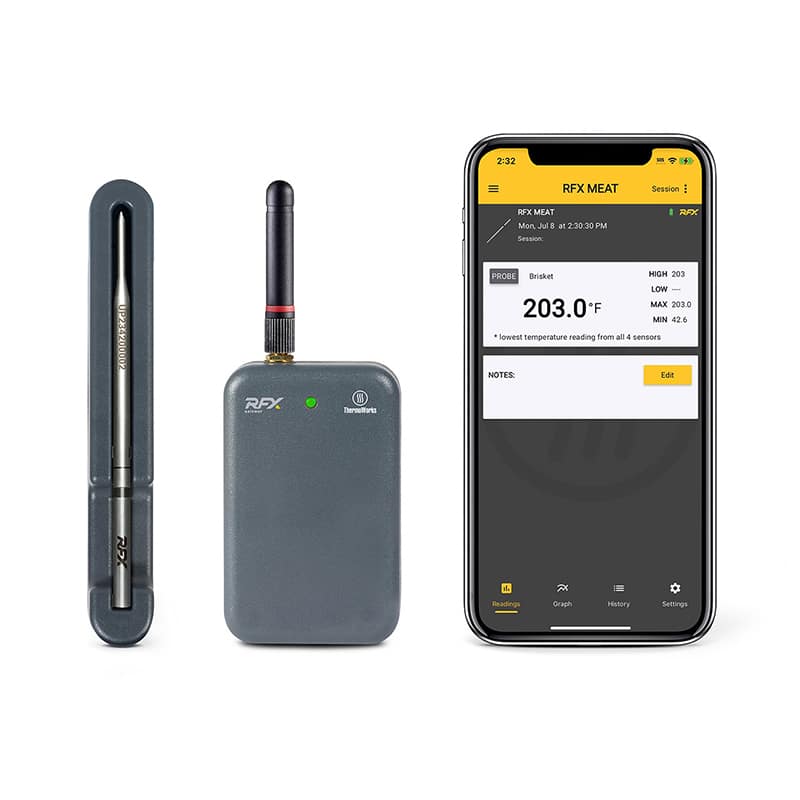
The ThermoWorks RFX is the company’s entry into the wireless thermometer category. This review of the ThermoWorks RFX wireless thermometer also includes a rating. Wireless thermometer technology typically presents some problems, and this product employs several novel approaches to solve some of the problems.
Typical Wireless Problems
Most competitors’ products have a sensor in the handle end that purportedly measures the “ambient” temperature, often mistakenly assumed to be the cooker’s temperature. The handle sensor’s proximity to the cold food results in a measurement that is significantly lower than you set the cooker for, creating some confusion. ThermoWorks addresses this problem by trading a sensor in the handle for a conventional wired sensor that clips to the grill grate far from the food. This sensor’s reading delivers a better indication of the temperature inside the smoker or oven.
Signal attenuation is another problem afflicting wireless thermometer technology. It is typically caused by the metal walls of the cooker, and when the signal attenuates, you lose an accurate temperature reading. Most thermometers employ Bluetooth to communicate between the probe and your smart phone or a nearby signal repeater. Bluetooth operates around 2.4GHz, and metal enclosures dramatically diminish its signal. To solve the problem, ThermoWorks’ RFX probe operates at 433MHz and the same device, called a gateway, receives its signal that connects to the wired sensor mentioned above. This lower frequency of 433 MHz reduces signal attenuation, resulting in a more stable connection. The information from the wired sensor and the wireless probe is relayed via your router’s Wi-Fi connection to the cloud where it can be accessed by an app on your phone or a computer connected to the internet.
Thermoworks RFX Set Up
Setup of the probe and gateway is very easy. ThermoWorks uses one app to work with its many products. When you open the app, a screen prompts you to add a device to its database. It walks you through the steps needed to connect the gateway to your router and to pair the wireless probe with the gateway. Once you finish with that, you’ll be able to access the hardware and can begin monitoring your cooking session.
One ThermoWorks RFX gateway can accommodate more than 50 wireless probes simultaneously, and you can give each a name so you know which probe is in which piece of food. You can also set temperature alarms for each probe individually. To recharge a probe, you simply insert it into its charging cradle which you power with one AAA battery. ThermoWorks says that one battery will provide enough energy to fully charge the probe 175 times, but I did not test this claim.
You must insert the wireless probes into the food up to an etched line on the probe so that the internal electronics don’t rise above 212°F. The food acts as a heat sink, preventing excessive temperature rise. ThermoWorks RFX has four sensors near the tip of the probe. The device selects the sensor with the lowest temperature as the core temp, so placement of the probe in the food is not as critical as it might be if the device had only one sensor.
Accuracy Tests
For this ThermoWorks RFX wireless thermometer review, I tested the temperature accuracy of the product’s wireless probes. I measured accuracy at 135°, 160°, and 205°F, and the test results were 134.9°, 160.2°, and 204.9°F, which are near-perfect accuracy results.
At the time of this writing, November 2024, the Thermoworks app does not have a predictive feature that estimates when your food will reach its target temperature. These time predictions are extremely difficult to make accurately, and there is little agreement between competing products’ time estimates. Predicting exactly when your food will be done is still a work in progress, and ThermoWorks has advised that they are working on the problem.

Conclusion
One of my pet peeves with thermometer smart phone apps is a lack of documentation showing how to control and monitor cooking progress by using the app’s features. I’m still nagging ThermoWorks and other manufacturers to PLEASE provide some step-by-step instructions to set up a typical cooking session and to use the hidden features that the app developers have programmed. I understand that these apps change frequently, especially with a new product, but it would be nice to download a PDF instruction manual. They can easily mark updated manuals as “V2” or with a change log at the beginning so users can stay on top of the product’s evolution. Maybe a 12-year-old can figure out an app in five minutes, but users of a certain age may struggle with it.
Like all the company’s products, build quality on the Thermoworks RFX is excellent and customer service is an e-mail or phone call away.
Even though I’m not thrilled with the app, it’s still early in this product’s release, and this company will get it right. Considering the high quality, functionality, and accuracy of the hardware, I’m going to give this product a good review anyway. Another Gold Medal for ThermoWorks.