

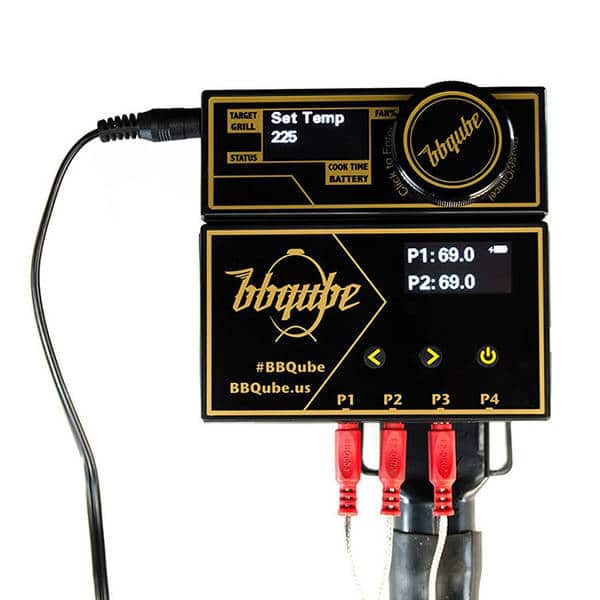
The BBQube TempMaster Pro is a combination thermostatic controller and remote four-channel thermometer designed to regulate the cooking environment in a charcoal-fired smoker or grill. It contains two modules: the controller and the thermometer. The latter can be disconnected from the controller for use as a stand-alone thermometer.
BBQube TempMaster Pro Features
The unit is supplied with three temperature probes. One has a clip that attaches the unit to a cooking grill and is used to sense the cooker’s internal temperature. There are two food probes of different lengths that provide the temperatures of the meat being cooked.
The combined unit is powered by a supplied AC adapter or an optional battery pack. The thermometer module is powered up when the controller is plugged in. Or, it can operate on its own internal battery if used stand-alone.

Using the Controller
The controller has an internal fan that delivers air to the cooker via a flexible hose and an adapter tailored to the cooker in use. For this test, I used the Weber adapter which fits over one of the lower air vents of my 18.5” Weber Smokey Mountain (WSM). Adapters are also available for the Big Green Egg, Kamado Joe, Akorn Grills, Weber Kettle Grills, and Weber Go-Anywhere grill. The controller reads the cooker’s temperature from the probe attached to the grill. It compares this value to the user’s temperature setting and raises or lowers the airflow to regulate the internal temperature. The user selects the type of cooker from the setup menu and then selects the target temperature. Everything is automatic from there.
The user can alternately set the controller to deliver air at a fixed rate without regard to temperature. The controller also has an adjustable count-down timer. When set, this will decrement the time until zero is reached, and then put the controller in idle mode, effectively ending airflow to the cooker. An elapsed timer also displays the amount of time that has passed since the cook started. More on the elapsed timer later.
When powered up, the user sets the target temperature, which defaults to 200°F. This initiates the BBQ mode where the controller will modulate the airflow to the cooker. However, if power is lost, even momentarily, the unit will go into the idle mode, the set temperature will revert to its default, the elapsed timer will be reset, and the count-down timer, if used, will also go to zero. All the user’s settings (except the type of cooker selected) are lost, and there is no indication that this power loss and resulting data loss has occurred. This is a problem.
Using the App
The thermometer module can communicate with a downloadable app that runs on the Apple or Android platform. The connection is via Bluetooth BLE 4.0. Once communication is established, the app will display the set temperature, the elapsed time, the count-down timer value, the fan output, and information about each temperature probe. In the app, an upper temperature threshold can be set for each channel independently, but there is no lower temperature setting. Therefore, if the cooker’s temperature drops, there is no way to alarm that event. Despite setting an alarm temperature, nothing happens when that temperature is reached – there is no sound or visual indication at all.
Each probe can display a graph of its temperature vs. time as well as its alarm setting. However, if connection is lost or the user inadvertently exits the app, all the graphical data and all alarm settings will be lost. The app cannot control any of the settings – it is read-only – a significant drawback if you want to make setup changes from your smart device.
Our Tests
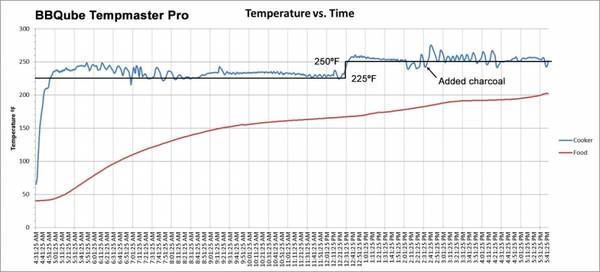
I tested the BBQube TempMaster Pro while cooking a pork butt for 13 hours. I set the initial target temperature to 225°F. At 12:31 PM, I raised the temperature to 250°F at the controller, and it responded quickly. This unfortunately reset the elapsed timer to zero, so I lost the cumulative cook time. At several points during the cook, I activated the “pause” control while I opened the cooker to jostle the charcoal or add wood chips. The pause mode prevents the controller from overreacting to the quick temperature drop which would then cause a spike in fan output.
Results
This feature worked well. At 2:41 PM I added some lit charcoal due to fuel exhaustion. This caused the controller to oscillate a bit, but this is not a problem. It soon settled back down to the target temperature. Since running this test, a firmware release has been installed which the manufacturer claims will improve the behavior when adding fuel. (The graphical data above was captured using another manufacturer’s thermometer. It’s common for small disagreements between temperature probes, even when placed in close proximity, so ignore the small temperature offsets between controller settings and measured values.)
Neither the controller nor the app allows the user to define conditions (other than the count-down timer) that would terminate the cook or change the target temperature. This limits the control the user has over the progress of the cook. The firmware can be updated using a USB cable attached to the user’s computer, so this may change in future updates. There is also an optional relay attachment that would allow the controller to operate a sous vide cooker.
The product documentation is thorough, including advice on how to build a stable fire. There is no explicitly stated warranty in the owner’s manual, but the website states one year. The user is directed to the website for firmware updates, app downloads, manuals and instructional videos. You can find contact information, including telephone number and e-mail address, on the website. Their customer service center is in Atlanta, GA.
Our Review
So, what’s the verdict? The BBQube TempMaster Pro is attractive and nicely packaged. The temperature probes are well-made. It controls the temperature of the cooker very well. However, the susceptibility of the unit to power interruptions is problematic. If the target temperature is changed, resetting the elapsed timer makes no sense. The lack of audible or visible alarms when temperature thresholds are crossed is a significant problem. The inability to alarm any drops in cooker temperature is a drawback. An app that loses graphical data and alarm settings after a single miscue by the user is troublesome. The inability to control the unit via the app could be problematic for many users.
Hopefully, BBQube will address these shortcomings in future firmware revisions and updates to the app. In its current configuration, it lacks features found in competing products and is unduly sensitive to disruptions of power or user errors. I’ll give it a Bronze Medal for ease of use and temperature control. Future updates may raise its rating.